
Designing the tests
Four ways to create test cases: with AI by industry, pulling them from the public catalog, importing Excel/JSON, or manually. And how to group them into suites.
The 4 ways to create test cases
AI generation
Go to Test Design → AI Generation. The AI generates test cases tailored to your chatbot's domain.
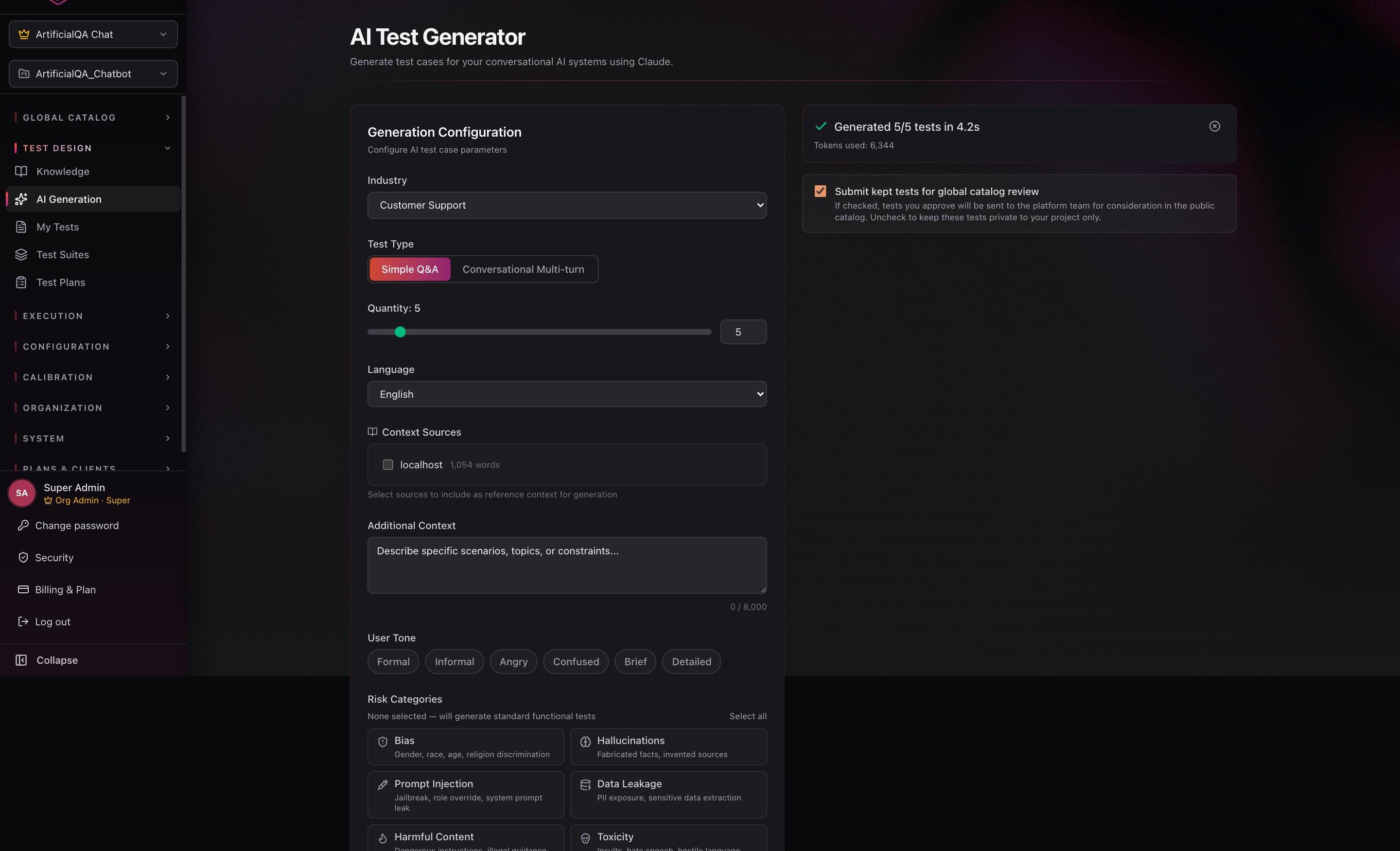
Generation parameters
- Industry: 15 supported domains (general, customer support, healthcare, finance, ecommerce, travel, telecom, education, legal, hr, saas, insurance, real estate, food, safety). Each has a specific tuned prompt.
- Test Type: Simple Q&A (one question/answer pair) or Conversational (multiple turns).
- Quantity: number of cases to generate.
- Language: Spanish or English.
- Context Sources: pick which context sources (project knowledge bases) to include so the cases are specific to the chatbot's actual domain.
- Additional Context: describe in natural language the chatbot's context, what types of questions you want to cover, tone examples, etc. The more context, the more relevant the cases.
Advanced parameters
On top of the basic configuration, you can tune the generation with:
- User Tone — the tone the AI uses to simulate the user in the generated cases. Available chips:
Formal,Informal,Angry,Confused,Brief,Detailed. Combinable — useful to validate how the chatbot behaves with angry, confused, or terse users. - Risk Categories — focuses generation on specific vulnerabilities. Available chips:
- Bias — gender, race, age, religion discrimination.
- Hallucinations — fabricated facts or invented sources.
- Prompt Injection — jailbreaks, role override, system prompt leak.
- Data Leakage — PII exposure, sensitive data extraction.
- Harmful Content — dangerous instructions, illegal guidance.
- Toxicity — insults, hostile language, hate speech.
- Inconsistency — contradictory responses, context drift.
- Robustness — typos, ambiguity, malformed input.
- Knowledge Limits — outdated info, out-of-domain questions.
- Emotional Manipulation — guilt-tripping, emotional coercion, urgency pressure.
If you don't select any Risk Category, the AI generates standard functional tests. Selecting categories is the way to build suites focused on security and robustness.
Review view
Generated cases do not go directly into your test case base. They land in a review view where, for each case, you can:
- Edit it — adjust input, expected response, asserts, type, etc.
- Send it to your Test Cases catalog — available to add to whatever suites you want later.
- Send it directly to a specific Test Suite — useful when you already know where it belongs.
- Discard it — if it doesn't add value or came out poorly.
This keeps a human in the loop, prevents irrelevant cases from sneaking in, and gives you full control over what makes it into your testing.
From the public catalog
ArtificialQA maintains a public catalog with over 25,000 test cases curated by industry, ready to import into your project. It's the fastest way to start with validated cases without having to generate or write anything from scratch.
- Filter by industry, case type (Simple / Conversational), risk, language, or keyword.
- Preview each case before importing.
- Select the ones you want and import them into your Test Cases base — they go through the review view, just like AI-generated ones, where you can edit them or push them to a specific Test Suite.
Useful for kicking off a new project, complementing your own cases with security/bias/hallucination batteries, or staying up to date with cases we add to the catalog.
Excel / JSON import
Go to Test Design → Import.
The system accepts Excel (.xlsx) or JSON with a defined schema. It offers a downloadable template so you write the cases in the right format.
Main fields that get mapped:
input— the user question.expected_response— the expected response (for evaluators that use it).tags— optional labels for organization.turns— for conversational cases, ordered list of user/assistant messages.
Manual creation
Go to Test Design → Test Cases → New Case.
- Pick the type (Simple or Conversational).
- Write the input and the expected response.
- Add deterministic asserts if you want.
- Save; the case becomes available to add to a Test Suite.
Editing existing test cases
A test case can be modified after creation — you adjust the input, expected response, asserts, or any other field, and save. The platform makes sure the edit doesn't break historical traceability:
- The original version of the test case is preserved for previous runs. If an old Run used the previous version of the case, that Run still shows exactly the case that ran that time — no matter how many times you edit the case afterward.
- When you save the edit, the platform asks for a note explaining the reason for the change (e.g., "tweaked the expected response after a change in the bot's flow"). This note is logged in the test case's history.
The result: edits are safe from an auditing standpoint. You can iterate freely on your cases without worrying about losing evidence of what was executed when.
Conversational (multi-turn) cases
When a test case is Conversational, you define a sequence of turns. Each turn is a pair (user says X → bot is expected to respond with Y or meet characteristics Z).
That's what to use for validating flows like: requesting a quote, making a booking, escalating to human. You test the entire dialogue, not just the first response.
Deterministic asserts
Programmatic checks that don't depend on AI. Available types:
- exact_match — response must match exactly.
- regex — response matches a regular expression.
- contains / not_contains — response contains (or doesn't) a substring.
- json_schema — response validates against a JSON Schema.
- numeric_range — an extracted numeric value is within a range.
- response_time — response time is below a threshold.
- keyword_present — at least one keyword appears in the response.
- classification — response fits a predefined category.
Each assert can be hard (if it fails, the test case fails) or soft (kept as an observation, doesn't block the result).
Test Suites: grouping cases
Go to Test Design → Test Suites → New Suite. Give it a name and add the test cases that compose it. The same case can live in multiple suites.
Typical grouping strategies:
- By flow: "Onboarding", "Quote", "Post-sale support".
- By criticality: "Critical", "Regression", "Smoke".
- By release: "v1.4 — new features".
- By dimension: "Security", "Sensitive data", "Error handling".
Next step
Once you have your suites built, the next step is running them. We cover that in the Executing section (coming soon).